Send the Quote. See It Get Watched. Get the Yes.
SmartProposal turns a quote into a personal page: your video walkthrough, your face and phone number, the documents, and an Accept button. You know the minute they open it, and exactly what they said when they accept or ask a question.
Record the video, paste the link, send. Thirty seconds of your time per proposal.
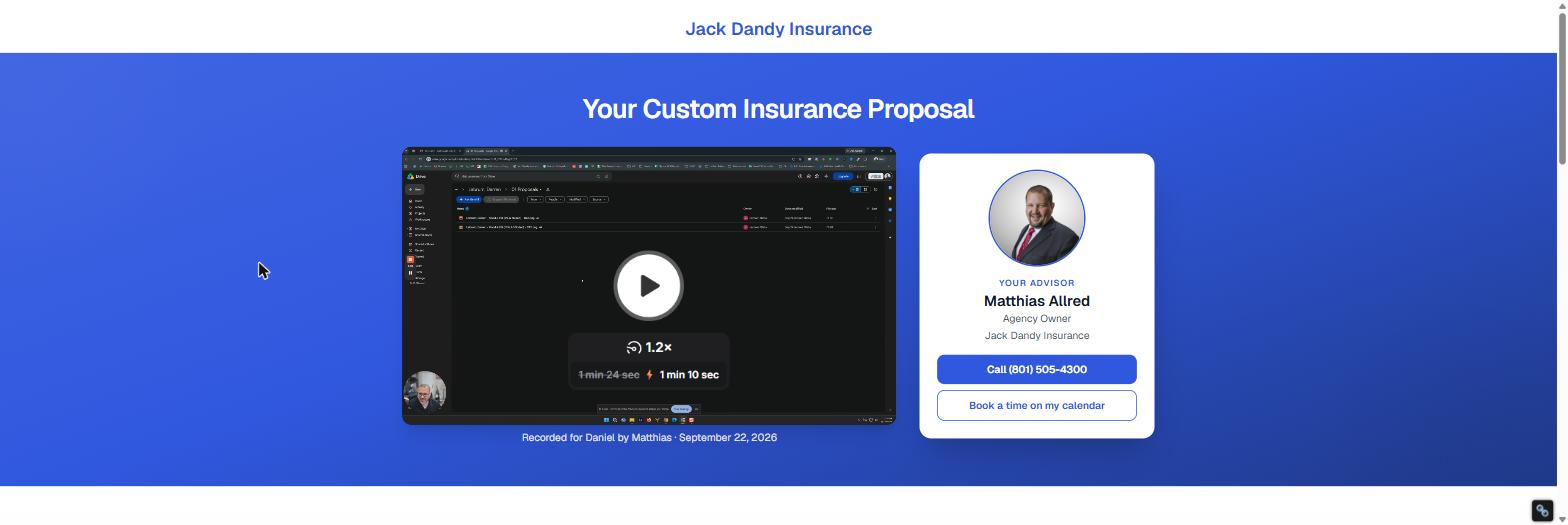
Daniel viewed the proposal
7:12 PM · watched 1 min 10 sec
Accepted · Home + Auto
Start date, billing choice, and comments in your inbox and your CRM
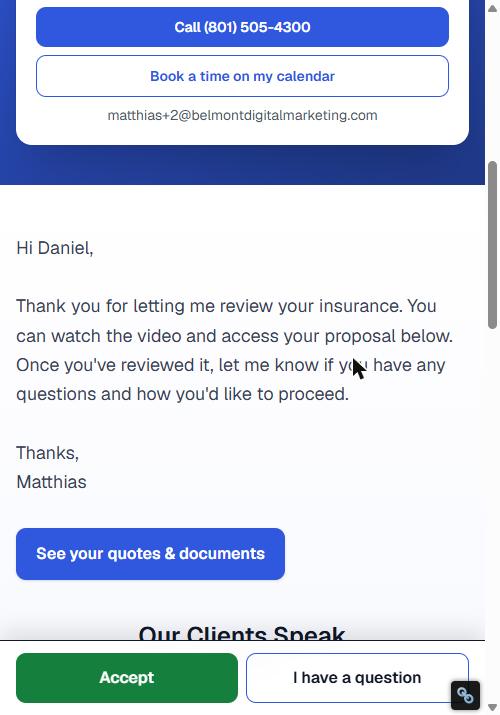
A real SmartProposal page from our demo agency, Jack Dandy Insurance. Your logo, your colours, your agents.
30 sec
of agent time per proposal:
record, paste the link, send
1 tap
for the client to accept
or ask a question
100%
of views, opens, and answers
on the proposal timeline
$0
setup fee.
Month to month, cancel any time
Quotes Die in the Gap Between "Sent" and "Signed."
Every agency loses deals here. Not because the price was wrong, but because the proposal was easy to ignore.
The PDF in an Email
You attach three carrier quotes, write a paragraph, hit send. Then nothing. Did they open it? Did they read the auto quote but skip the home? You find out in a week, if you remember to follow up.
The Voicemail Loop
You call to walk them through the numbers. They're at work. They call back while you're with a client. Three days of tag over a five-minute explanation.
The Video That Went Nowhere
You recorded a great walkthrough. It's sitting in a text thread next to a PDF and a calendar link, and the client has no idea what they're supposed to do first.
The Yes That Got Lost
They finally reply with 'let's do it.' Now you need a start date, how they want it billed, and the mortgage company. Two more emails. Two more days.
The fix isn't a better PDF.
It's a page that does the follow-up for you.
How It Works
Three steps. The only thing an agent types is the video link.
Record the walkthrough
Use the tool you already use: Loom, YouTube, whatever's open. Two or three minutes on what you found, what you'd recommend, and what it costs. Copy the share link.
Paste the link, create
Open the new-proposal screen, straight from your CRM record if you like, with the client's name and details already filled in. Paste the video link, attach the quotes or a Drive folder, click create. The page is live.
Send it, then watch it work
Text or email the link with one click on Copy message. You'll know when they open it, which documents they read, and the moment they tap Accept or ask a question. Your CRM can know too.
Everything a Proposal Should Do. On One Page.
A SmartProposal has three jobs: get watched, get understood, and get answered. Here's how it does each one.
Your video, front and center
Paste a Loom, YouTube, Vimeo, Wistia, or Vidyard link and the page builds the player for you, with a caption that says it was recorded for them, by you, on the day you sent it. No embed codes, no uploads.
You, not a logo
Every page carries the agent card: photo, name, title, a tap-to-call number, and a "book a time" button. Clients buy from a person. The page makes sure they know which one.
The quotes, right there
Upload the carrier PDFs, or link the Google Drive folder you already use. They render on the page with open and download tracking, so you know which quote they actually looked at.
One button to say yes
Accept opens a short form: start date, how they'd like the home policy billed, how they'd like the auto billed, comments. Everything you need to bind, captured the moment they decide. No payment details, ever.
One button to ask
Questions arrive with a topic and how the client wants to be reached, whether text, email, or a call, so you answer once instead of playing tag. Reply-to is set to them.
You know the moment it happens
First view, every accept, every question: an email to the agent, and a webhook to your automation if you use one. Each agent chooses which emails they want. Link previewers and bots never count as views.
A pipeline, not a spreadsheet
Sent, Viewed, Question, Accepted. Every proposal is a card you can open for the full timeline: each view, each document opened, each answer, with timestamps. Managers see the agency; agents see their own.
Fits the tools you already run
A link from your CRM pre-fills the client's details, so an agent only pastes the video. A full API and signed webhooks let n8n, Zapier, Make, or anything else create proposals, attach documents, and move your CRM stages. Pairs naturally with SmartCSR on one login.
Three Ways to Send a Quote
Most agencies do the first one. The good ones do the second. Here's what the third changes.
| Email + PDF | Video link + PDF | SmartProposal | |
|---|---|---|---|
| Agent time per proposal | 5–10 min writing the email | 5 min plus juggling links | About 30 seconds |
| Know when it was opened | No | Maybe, if the video tool tells you | Yes, first view and every view after |
| Know which quote they read | No | No | Yes, per document |
| Client says yes by | Replying, eventually | Replying, eventually | Tapping Accept |
| Start date, billing choice, mortgage co. | Two more emails | Two more emails | Captured with the Accept |
| Questions come with | Whatever they typed | Whatever they typed | A topic and how to reach them |
| Your face and phone number | A signature block | In the video, if they play it | On the page, tap to call |
| Feeds your CRM | Manually | Manually | Webhooks and an API |
| Monthly | $0 | Your video tool | $97, whole agency |

Built by an Agency Owner.
Because Nobody Else Was Going To.
I own an independent P&C agency. Years ago I got tired of sending quotes into a void, so I duct-taped together a video, a form, and a link shortener into a proposal page. It worked better than anything the carriers or CRMs gave me: clients watched, clients accepted, and I stopped chasing.
It ran on WordPress plugins and a lot of my own patience. SmartProposal is that page rebuilt properly: one place for the video, the quotes, and the yes, with the tracking and the API I always wished it had. My agency sends every proposal through it.
If it doesn't make a client easier to close, it doesn't go in the product.
Matthias
Agency Owner & Founder, SmartProposal.Pro
One Plan. Whole Agency.
$97 a month, however many agents you have and however many proposals they send. No setup fee. Month to month. Cancel by email.
SmartProposal
Everything, for everyone in the agency. Nothing is gated behind a bigger plan or a per-seat charge.
- Unlimited proposals, unlimited agents
- Your own branded proposal address: your-agency.smartproposal.pro
- Video from Loom, YouTube, Vimeo, Wistia, or Vidyard, just paste the link
- Agent card with photo, phone, and calendar link on every page
- PDF uploads or Google Drive links, rendered on the page
- Accept and Question buttons with the forms you configure
- View, open, accept, and question tracking on a pipeline board
- Email notifications per agent, on or off individually
- Full REST API and signed webhooks for n8n, Zapier, Make, or your own code
- Testimonials and marketing links on every proposal
- One login shared with SmartCSR and SmartSites
- Hosting, updates, and support included
Add the rest of the family
SmartProposal, SmartCSR (service & ticketing) and SmartSites (your website) share one login and one bill.
- Any one product
- $97/mo
- Any two
- $149/mo
- All three
- $199/mo
Add or drop a product any month. The SmartSites content add-on stacks on top if you take that.
30-day money-back guarantee on new subscriptions. Cancel any time by email; it takes effect at the end of the month you've paid for. Full details in the Terms of Service.
Frequently Asked Questions
What does the client actually receive?
Do I have to use a particular video tool?
How do the quote documents get on the page?
What happens when a client clicks Accept?
Does SmartProposal collect bank or card details?
How do I know the client looked at it?
Will it work with my CRM and automation tools?
Is there a per-agent charge?
What if I already use SmartCSR or SmartSites?
Can I customise what the page says?
How long does setup take?
Is there a contract or a setup fee?
See a Proposal Built in Front of You.
Book 15 minutes. I'll record a quick video, build a proposal page for a made-up client while you watch, and send it to your phone so you can tap Accept yourself.
No slides, no sales script. Just an agency owner showing you the tool he uses every week.
You'll be talking to me, not a rep.
— Matthias